This page is your one-stop shop for all the resources mentioned during the ‘Take the plunge with Gemini’ session at the Google Teaching Theatre – EduTECH Melbourne 2024.
If you came to my session, I’d love to hear your feedback! Complete the short form in the EduTECH app and share some ways you are using AI with staff and students.
Image created by meta.ai: “A cartoon image of a student developing AI prompts to help them with their learning. The student is looking confident and the feeling is optimistic.”
This page contains a number of session resources used in a workshop I presented at the Tauranga Innovative Education Summit held at the University of Waikato in Tauranga on Monday 24th of June.
Session Deck:
Table of selected AI Tools:
“If AI can do it, why would I ask the student to do it instead?”
“…, plagiarism is not only an issue of student assessment. It is a symptom of a deeply entrenched academic culture that arguably places tangible rewards (grades, diplomas, publications, promotions, grants) above the intrinsic value of learning and knowledge creation.”
News flash! There’s this thing called Artificial intelligence (AI) and it can help you do stuff!! As an educator, since ChatGPT emerged in November 2022, I have been intrigued by the possibilities of integrating AI into my teaching practice and getting students hands on with these amazing tools.
Let’s be clear about what I mean by AI. Although it has a very broad definition (for example, a spell checker is a version of AI), in this post I am focusing on generative AI. Generative AI tools can create new text, images, code, and other outputs based on the data they are trained on. When a user prompts the tool, it uses its knowledge to produce a response. These responses are original, but they come from the information the AI processed during training.
One of the best resources I have seen recently is The North Carolina Department of Public Instruction (NCDPI) guidebook for the use of AI in schools. It serves as a valuable resource for teachers by providing a comprehensive overview of the potential benefits and challenges of using AI in schools, as well as practical guidance on how to implement AI technologies in a responsible and ethical manner. The guidebook covers a wide range of topics, such as the types of AI technologies available, discussions on the legal and ethical considerations of AI use in schools, and strategies for enhancing student learning outcomes with AI.
A good way to think about generative AI tools in education is as a complementary tool that enhances learning without replacing human educators. Think of AI as being like an electric bike, which amplifies human effort, rather than a robot vacuum, which operates entirely on its own. Taking this metaphor further, this image explains appropriate use.
The guidebook goes on to give advice on selection of AI tools. When choosing AI tools for schools, factors such as capabilities and limitations, bias mitigation, student privacy, human oversight, and accessibility should be considered. We should deliberately teach students about these aspects of using GenAI tools, so we can avoid spending unnecessary energy trying to catch students from inappropriate use.
Post plagiarism: writing in the age of AI
Seemingly, the main concern about student use of AI revolves around authenticity. Authenticity, in this case defined by NZQA, is “the assurance that evidence of achievement produced by a learner is their own.” Dr. Sarah Elaine Eaton argues that AI will fundamentally change how we view writing, authenticity and plagiarism. In her concept of a “post-plagiarism world,” humans and AI will collaborate on writing, leading to a rise in hybrid writing styles. However, humans will still be responsible for the content created, including fact-checking and the ethical use of AI tools. While traditional plagiarism definitions may not directly apply to AI-generated text, because AI can generate unique text that is not copied from another source, the core idea of attribution and respect for sources will remain important. Overall, AI will have a significant impact on writing in the future. However, it is important to remember that AI is a tool that can be used to enhance human creativity, not replace it.
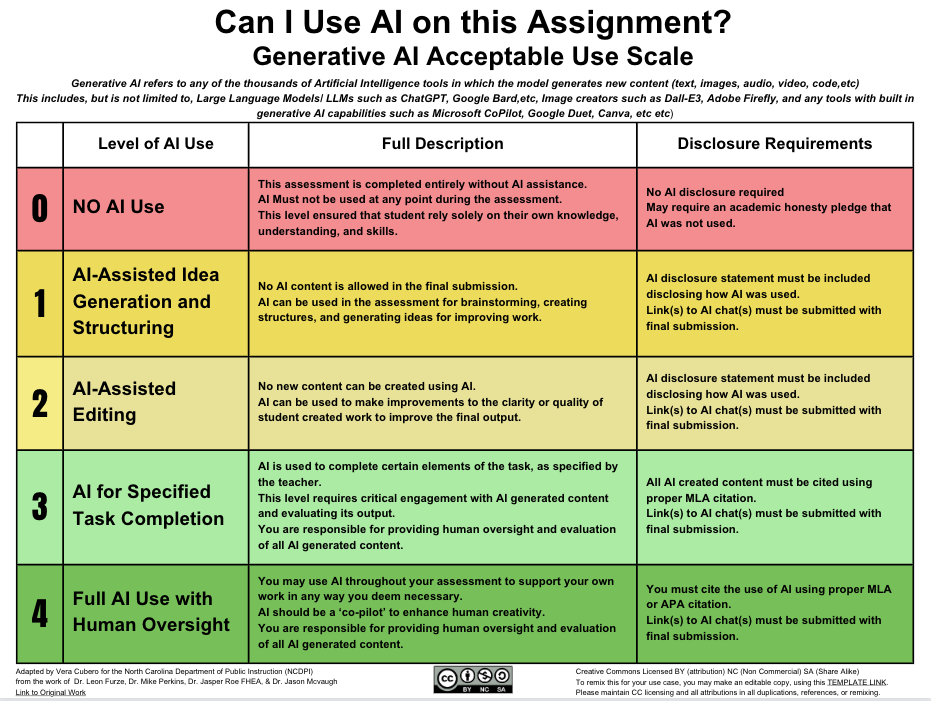
A possible solution is to give learners clear guidelines on appropriate use in assigned tasks. If we can clearly explain to learners how and when to use these tools, they will be better at making deliberate choices for themselves. Here is the suggested scale:
Using AI Tools with Students: Navigating Age Restrictions
The number of tools targeted at educators is overwhelming. Check out the AI Educator Tool repository. One challenge educators encounter when using AI tools with students is the complexity of navigating age restrictions due to privacy and data protection regulations. While AI technology offers immense benefits in terms of efficiency and effectiveness, there are often age restrictions in place due to privacy concerns and data protection regulations. As educators, it is crucial to be mindful of these restrictions.
So, having to be selective, here is a summary of the different tools I have used with learners:
One important consideration is accessibility. In particular, can the use of the tool in class comply with the tool’s terms of service? The main one is age restriction. As educators, it is essential to navigate these age restrictions responsibly and find ways to incorporate AI tools into our teaching practices that meet the terms of use and are appropriate for learners.
I had made initial use of the Codebreaker.edu tool, as students were not required to sign in with an account. Despite being limited to 2000 character inputs, the tool is valuable for generating basic prompts and text-based outputs. However, the Terms of Service state that it uses a custom interface of OpenAI’s GPT-3, which implies that users must be 13 or older with parental permission.
Recently, Magic School.ai released a student tool called Magic Student. This tool doesn’t seem to have a strict 13+ age requirements, provided your school has notified parents/guardians.The terms of use state that the tool does protect the privacy of younger children and is compliant with regulations such as the Children’s Online Privacy Protection Act (COPPA) in the United States. The interface appears to be a walled garden, with a teacher being able to see how students are using the prompts.
Intrigued by this, I dove into the online training offered by Magic School.ai and became a Magic School AI Pioneer. This experience not only enhanced my understanding of AI’s capabilities but also introduced me to a valuable tool, which appears to be suitable for students under 13 years old, addressing their specific needs.
Conclusion
When integrating AI into education, a thoughtful and responsible approach is necessary, taking into account the benefits and challenges of AI implementation. By navigating age restrictions ethically and implementing AI tools strategically, educators can harness the power of AI to create personalised and engaging learning experiences that empower students to succeed in the digital age. It is crucial for educators to pay attention to the terms of use for AI tools they are using with learners to ensure they are deliberately taught appropriate use.
Acknowledgements: this post was written with the help of AI Tools (Google Gemini, Magicschools.ai, Quillbot
Artificial intelligence (AI) is rapidly transforming the education landscape. From personalised learning platforms to chatbots that can grade student work, AI is providing teachers with new tools and resources to help students learn more effectively.
In this blog post, I will explore the many ways that AI is being used in the classroom today. I will also share a video showing how ChatGPT can be used by teachers to mark student work. Finally, I will provide some tips on how to use Google Bard, a large language model from Google AI, to create engaging and interactive learning experiences for your students.
Are you a teacher? You should use AI!
Here are some of the ways that AI is being used in the classroom today:
Personalized learning platforms: These platforms use AI to track student progress and deliver personalized learning experiences that are tailored to each student’s individual needs.
Chatbots: These AI-powered assistants can grade student work, answer questions, and provide feedback.
Virtual reality: This technology can be used to create immersive learning experiences that transport students to different places and times.
Gamification: This technique uses game-like elements to make learning more fun and engaging.
AI has the potential to revolutionise the classroom in many ways. It can help teachers:
Save time on grading and other administrative tasks
Provide students with more personalised learning experiences
Identify and address learning gaps early on
Create more engaging and interactive learning experiences
If you are a teacher who is interested in using AI in your classroom, there are a few things you need to know:
There are many different AI tools and platforms available, so it is important to choose one that is right for your needs.
It is important to train AI tools on high-quality data in order to get accurate results.
You should be transparent with students about how AI is being used in your classroom.
Conclusion
I hope this blog post will give you a better understanding of how AI is being used in the classroom today. If you are interested in learning more, I encourage you to watch the video below and check out the resources that I have linked to.
Different levels of AIFeatures of the Google Bard interface
Check out the presentation below on AI in the Classroom
Algebra is one of those often reviled topics for students – it’s too hard, it doesn’t make sense, and what the heck are those letters doing in a maths equation! Finding ways to connect students with the concepts that underpin those seemingly meaningless questions helps them grow confidence and may even change their attitude!
Over the last few years I have played around with using Scratch to have my students engage with Algebra. Scratch is a free, online coding platform that can be used to teach a variety of subjects, including algebra.
I have developed a unit on Learning Algebra with Coding that is built around a project based approach. The unit has a progressive set of coding challenges that are rooted in an algebraic concept. The unit begins by introducing students to the basics of coding, such as variables, loops, and conditionals. Students then use these concepts to create projects that explore algebraic concepts, such as linear equations, functions, and recursion. Variables are an essential concept to understand and I often introduce this by getting students to think of where they see variables in their world.
Projects
Here is the list of project for students to complete (worked examples are also available in a Scratch studio). Please note that this list has links to worked solutions so shouldn’t be shared with students as they should figure out the solution themselves!
Pattern maker: create a project that has number patterns (odd, even, square, prime, Fibonacci…). Try to also create some sound patterns and drawing patterns using the pen tool.
Programming music patterns: create a programme for users to interact with to create or modify a musical pattern.
Cartesian plane: using the xy-backdrop, create a project where users input a co-ordinate pair which moves a sprite
Plotting patterns: create a project where users enter a rule (e.g. + 3, – 5) or a gradient and y-intercept which the programme plots a straight line on a cartesian plane
Battle ships: create a project that is like the old school game of ‘Battleships’.
Function machine: create a project that generates a list of co-ordinate pairs and users have to input the rule
Guess my number: create a project that the user ‘guesses’ the number that the code started with
Polygon maker: create a project where the user inputs the number of sides of a polygon and the programme draws this shape showing the size of the interior angle, exterior angle, and sum of interior angles.
Pi finder: create a project where the user inputs a value for the diameter of a circle, and the programme draws the circle showing that the diameter fits about 3 times in the circumference.
Classroom noise monitor: create a project that monitors classroom noise (use the ‘loudness’ variable in the Sensing blocks)y
Magic 8 Ball: Create a project for a magic 8 ball. Use a random probability (between 0-1) to return an answer relating to 8 different probability terms (unlikely, likely, possible, probable, impossible, very likely, certain, poor chance, 50-50 chance, good chance)
Calculator: Follow this tutorial to make a Scratch calculator.
Giving feedback on student projects
So you have your class working on all these different coding projects. How to see where they are all up to so that you can give them some next steps? You can use a combination of a Google Form and a shared Google Sheet. Check out this video for a walk through:
In conclusion, coding can be a fun and engaging way to teach algebra. Scratch is a visual and interactive platform that makes it easy for students to understand algebraic concepts. Students can experiment with different algebraic concepts and see how they affect the output of a program. This helps students to stay motivated and engaged in their learning.
If you are a math teacher looking for a way to make your lessons more engaging and interactive, then I encourage you to try using Scratch. It is a free, online platform that is easy to learn and use. Let me know how you get on!